> For the complete documentation index, see [llms.txt](https://pythonic01.gitbook.io/pythonic01/llms.txt). Markdown versions of documentation pages are available by appending `.md` to page URLs; this page is available as [Markdown](https://pythonic01.gitbook.io/pythonic01/try-hack-me/cheese-ctf-thm.md).

# Cheese CTF (THM)

Inspired by the great cheese talk of THM!

## Enum

So to kick things off we start with Rust Scan which give us insain results.

<figure><img src="https://616326001-files.gitbook.io/~/files/v0/b/gitbook-x-prod.appspot.com/o/spaces%2Fi149KGmTZ4nvE4TuOMXm%2Fuploads%2F84LdLAZ7iEKDvgtPEYgO%2Fimage.png?alt=media&amp;token=ddd99987-a324-46e3-8926-aac2bf137bc9" alt=""><figcaption></figcaption></figure>

As you can see there are a lot of open ports so as always i start with http or port 80.

<figure><img src="https://616326001-files.gitbook.io/~/files/v0/b/gitbook-x-prod.appspot.com/o/spaces%2Fi149KGmTZ4nvE4TuOMXm%2Fuploads%2FvURo9V4aUgcDf8r21Lpa%2Fimage.png?alt=media&amp;token=bf335215-6ddf-4c3f-b31b-5f1f0ae22cde" alt=""><figcaption></figcaption></figure>

We have few intrestring pages let's see the users.htm page.

<figure><img src="https://616326001-files.gitbook.io/~/files/v0/b/gitbook-x-prod.appspot.com/o/spaces%2Fi149KGmTZ4nvE4TuOMXm%2Fuploads%2FvDrVugjHDMAlRzt2ykLd%2Fimage.png?alt=media&amp;token=ce9236f0-6f94-4bc4-acb3-7b91c31e2782" alt=""><figcaption></figcaption></figure>

Nothing appear to be here let's see the login form.

<figure><img src="https://616326001-files.gitbook.io/~/files/v0/b/gitbook-x-prod.appspot.com/o/spaces%2Fi149KGmTZ4nvE4TuOMXm%2Fuploads%2FlLfo6VH4q889mjXDbHvC%2Fimage.png?alt=media&amp;token=8924ec07-c4dc-4f05-9b15-4f33ac685032" alt=""><figcaption></figcaption></figure>

I decide to user SQLMAP the goat of sql injection.

<figure><img src="https://616326001-files.gitbook.io/~/files/v0/b/gitbook-x-prod.appspot.com/o/spaces%2Fi149KGmTZ4nvE4TuOMXm%2Fuploads%2FLfXoQqEzYCTHdWdZKIml%2Fimage.png?alt=media&amp;token=9e4abf5f-7a5c-4fba-8cd9-58020f557140" alt=""><figcaption></figcaption></figure>

<figure><img src="https://616326001-files.gitbook.io/~/files/v0/b/gitbook-x-prod.appspot.com/o/spaces%2Fi149KGmTZ4nvE4TuOMXm%2Fuploads%2FMFQlOGQZfzcTZ4R9GR24%2Fimage.png?alt=media&amp;token=5ab9aa63-969f-4753-81dd-1472144de84b" alt=""><figcaption></figcaption></figure>

Intresting let's see what is there.

<figure><img src="https://616326001-files.gitbook.io/~/files/v0/b/gitbook-x-prod.appspot.com/o/spaces%2Fi149KGmTZ4nvE4TuOMXm%2Fuploads%2Fd3GdfLObWMcwJ3C5mwQa%2Fimage.png?alt=media&amp;token=480d5281-6b56-49e6-af01-f00fb6f6cd6b" alt=""><figcaption></figcaption></figure>

Appear to be a normal admin panel but take a look on the url :smile:.

<figure><img src="https://616326001-files.gitbook.io/~/files/v0/b/gitbook-x-prod.appspot.com/o/spaces%2Fi149KGmTZ4nvE4TuOMXm%2Fuploads%2FhGBMI5HaBRQoOcgMMFBz%2Fimage.png?alt=media&amp;token=3ef21f81-ea23-454a-863c-199a510f492a" alt=""><figcaption></figcaption></figure>

And Indded the target is vuln of LFI (local file inclusion). So let's try to access some important file maybe ssh key or something.

<figure><img src="https://616326001-files.gitbook.io/~/files/v0/b/gitbook-x-prod.appspot.com/o/spaces%2Fi149KGmTZ4nvE4TuOMXm%2Fuploads%2Fg84Fb1CaqflMSb1kiZLp%2Fimage.png?alt=media&amp;token=ceb32daa-2e16-47fb-b948-b3a376a9a7ca" alt=""><figcaption></figcaption></figure>

As you can see in the li tag there is a href which refers to php filter. If we are able to execute such thing on the web we can get RCE on the target machie.

<figure><img src="https://616326001-files.gitbook.io/~/files/v0/b/gitbook-x-prod.appspot.com/o/spaces%2Fi149KGmTZ4nvE4TuOMXm%2Fuploads%2FZUu43snm83Jyhl62GcaM%2Fimage.png?alt=media&amp;token=76bfd4a7-9d40-4d6f-b97c-a060e9650be1" alt=""><figcaption></figcaption></figure>

And indded we can. Let's find a way to execute php code in here.

We can us this tool.

{% embed url="<https://github.com/synacktiv/php_filter_chain_generator>" %}

Which help us or generate a chain of Filters to get RCE on the system.

<figure><img src="https://616326001-files.gitbook.io/~/files/v0/b/gitbook-x-prod.appspot.com/o/spaces%2Fi149KGmTZ4nvE4TuOMXm%2Fuploads%2FhuXmndVvCSZYUXQocET5%2Fimage.png?alt=media&amp;token=470b198b-81d4-4e51-b8bc-29eabe6663d7" alt=""><figcaption></figcaption></figure>

<figure><img src="https://616326001-files.gitbook.io/~/files/v0/b/gitbook-x-prod.appspot.com/o/spaces%2Fi149KGmTZ4nvE4TuOMXm%2Fuploads%2F3nklgtTpYHTXkVwqFYnU%2Fimage.png?alt=media&amp;token=3b42c467-8c2a-49c9-a5ac-baf822a32956" alt=""><figcaption></figcaption></figure>

And by doing so we have access as www-data.

## Access as comte.

As for this user it actully super easy we can see that in the .ssh of the comte user we have the file authorized\_keys and we can write into it so we just need to generate ssh key in our own machine and paste the public key in the authorized key as easy as that.

<figure><img src="https://616326001-files.gitbook.io/~/files/v0/b/gitbook-x-prod.appspot.com/o/spaces%2Fi149KGmTZ4nvE4TuOMXm%2Fuploads%2FNBseDAuUAkH11JglEa06%2Fimage.png?alt=media&amp;token=de6ca423-cacd-4807-b0a3-38989af7d552" alt=""><figcaption></figcaption></figure>

<figure><img src="https://616326001-files.gitbook.io/~/files/v0/b/gitbook-x-prod.appspot.com/o/spaces%2Fi149KGmTZ4nvE4TuOMXm%2Fuploads%2Fe6wZXzm9GAv4Pfem9IgA%2Fimage.png?alt=media&amp;token=ff2eee4a-f2e6-46f4-94fb-2713e68e5fc7" alt=""><figcaption></figcaption></figure>

<figure><img src="https://616326001-files.gitbook.io/~/files/v0/b/gitbook-x-prod.appspot.com/o/spaces%2Fi149KGmTZ4nvE4TuOMXm%2Fuploads%2F1mI94BqUgMXg7ZLadSzU%2Fimage.png?alt=media&amp;token=eb88d595-a57f-4288-9128-f1bad177d994" alt=""><figcaption></figcaption></figure>

<figure><img src="https://616326001-files.gitbook.io/~/files/v0/b/gitbook-x-prod.appspot.com/o/spaces%2Fi149KGmTZ4nvE4TuOMXm%2Fuploads%2Fjo8hZnxBlsoch8CfVCZV%2Fimage.png?alt=media&amp;token=7ca0ea18-c797-4b86-a7c0-36b04c817473" alt=""><figcaption></figcaption></figure>

## Access As Root

### just read the root.txt.

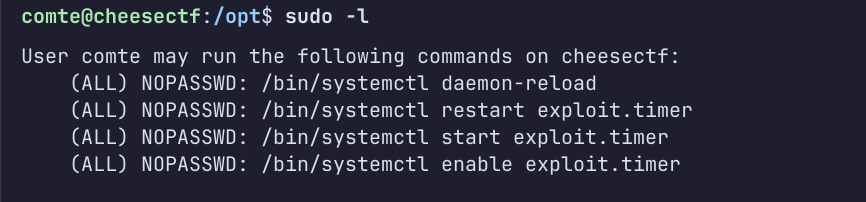
So since we have sudo for these.

<figure><img src="https://616326001-files.gitbook.io/~/files/v0/b/gitbook-x-prod.appspot.com/o/spaces%2Fi149KGmTZ4nvE4TuOMXm%2Fuploads%2FV0asIzzr9tEpM9Ta8zCw%2Fimage.png?alt=media&amp;token=02034ae2-e329-40c8-b7ba-3f9dcc371936" alt=""><figcaption></figcaption></figure>

we can start the exploit timer but it first it was giving me error.

<figure><img src="https://616326001-files.gitbook.io/~/files/v0/b/gitbook-x-prod.appspot.com/o/spaces%2Fi149KGmTZ4nvE4TuOMXm%2Fuploads%2FpmOIylog2M7yMu0iQ5XP%2Fimage.png?alt=media&amp;token=55b9ce38-91fd-470a-aad9-097942261cae" alt=""><figcaption></figcaption></figure>

So i just added a timer and it works.

<figure><img src="https://616326001-files.gitbook.io/~/files/v0/b/gitbook-x-prod.appspot.com/o/spaces%2Fi149KGmTZ4nvE4TuOMXm%2Fuploads%2FtpBu3unzclNxOaAJaTkI%2Fimage.png?alt=media&amp;token=7b2d579d-ae27-4730-9652-409acf9af337" alt=""><figcaption></figcaption></figure>

And after that we start the service and we will see a xxd binary with suid has spawn in /opt.

xxd is a hexdumb tool or Reverse as they said.

<figure><img src="https://616326001-files.gitbook.io/~/files/v0/b/gitbook-x-prod.appspot.com/o/spaces%2Fi149KGmTZ4nvE4TuOMXm%2Fuploads%2FgjGnXbHBkvBtQ8NYck3G%2Fimage.png?alt=media&amp;token=5d89cb0d-f90b-46f0-9409-edbd21c15dbb" alt=""><figcaption></figcaption></figure>

As of the exploti we can basiclly read and write anything since it has suid and the creater is the root user.

We can do like this and we are done.

<figure><img src="https://616326001-files.gitbook.io/~/files/v0/b/gitbook-x-prod.appspot.com/o/spaces%2Fi149KGmTZ4nvE4TuOMXm%2Fuploads%2FnxBzco6sUikPiDEOdv18%2Fimage.png?alt=media&amp;token=46b305dd-73b8-4deb-bdc1-4c7911a615b0" alt=""><figcaption></figcaption></figure>

### But where is the fun.

So as for the second way we want to access as root from ssh. We have alread ssh key inside .ssh of the comte user we just need to move that into the .ssh/authorized\_keys of the root to get access as root.

<figure><img src="https://616326001-files.gitbook.io/~/files/v0/b/gitbook-x-prod.appspot.com/o/spaces%2Fi149KGmTZ4nvE4TuOMXm%2Fuploads%2F7Ap8fl3qqXHUAkeOlRXU%2Fimage.png?alt=media&amp;token=b8fd9f56-5681-4d49-873a-5bc1e698e4e9" alt=""><figcaption></figcaption></figure>

Using this command we are able to move our public key inside .ssh of the root.

<figure><img src="https://616326001-files.gitbook.io/~/files/v0/b/gitbook-x-prod.appspot.com/o/spaces%2Fi149KGmTZ4nvE4TuOMXm%2Fuploads%2FMfedSTtELvsUMM3dmIcX%2Fimage.png?alt=media&amp;token=961da7c7-18ac-4333-b932-808cc76afa1e" alt=""><figcaption></figcaption></figure>

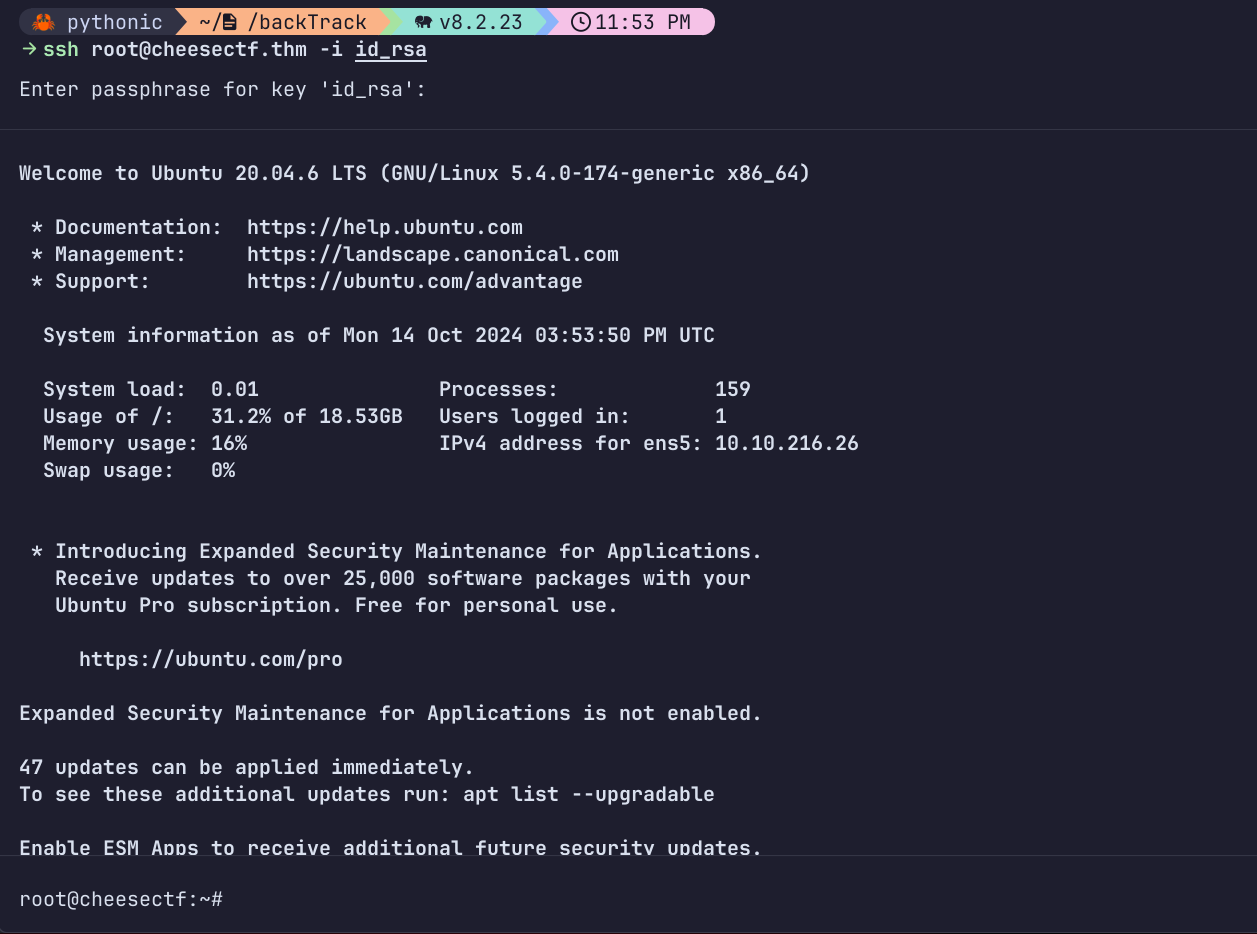
And now let's SSH.

<figure><img src="https://616326001-files.gitbook.io/~/files/v0/b/gitbook-x-prod.appspot.com/o/spaces%2Fi149KGmTZ4nvE4TuOMXm%2Fuploads%2FXiwUqF6MtVeZ1aDWRcNe%2Fimage.png?alt=media&amp;token=799b3956-c6ed-4d13-976b-0bed70b5f960" alt=""><figcaption></figcaption></figure>

<figure><img src="https://616326001-files.gitbook.io/~/files/v0/b/gitbook-x-prod.appspot.com/o/spaces%2Fi149KGmTZ4nvE4TuOMXm%2Fuploads%2FPSBMPl3CnZByFCpoKgB0%2Fimage.png?alt=media&amp;token=f2096d58-0843-4346-ae51-99ecb4d10383" alt=""><figcaption></figcaption></figure>