> For the complete documentation index, see [llms.txt](https://pythonic01.gitbook.io/pythonic01/llms.txt). Markdown versions of documentation pages are available by appending `.md` to page URLs; this page is available as [Markdown](https://pythonic01.gitbook.io/pythonic01/try-hack-me/service-thm.md).
# Service (THM)
At your service.
## Into
* Hello Every one today i want to do a windows machine as a part of my way to master AD (Active Directory) SHALL WE ??
## Enumeration
### Port scanning
```
53/tcp open domain syn-ack ttl 127 Simple DNS Plus
80/tcp open http syn-ack ttl 127 Microsoft IIS httpd 10.0
|_http-server-header: Microsoft-IIS/10.0
|_http-title: Above Services
| http-methods:
| Supported Methods: OPTIONS TRACE GET HEAD POST
|_ Potentially risky methods: TRACE
88/tcp open kerberos-sec syn-ack ttl 127 Microsoft Windows Kerberos (server time: 2025-01-04 10:29:23Z)
135/tcp open msrpc syn-ack ttl 127 Microsoft Windows RPC
139/tcp open netbios-ssn syn-ack ttl 127 Microsoft Windows netbios-ssn
389/tcp open ldap syn-ack ttl 127 Microsoft Windows Active Directory LDAP (Domain: services.local0., Site: Default-First-Site-Name)
445/tcp open microsoft-ds? syn-ack ttl 127
464/tcp open kpasswd5? syn-ack ttl 127
593/tcp open ncacn_http syn-ack ttl 127 Microsoft Windows RPC over HTTP 1.0
636/tcp open tcpwrapped syn-ack ttl 127
3389/tcp open ms-wbt-server syn-ack ttl 127 Microsoft Terminal Services
|_ssl-date: 2025-01-04T10:30:40+00:00; 0s from scanner time.
| ssl-cert: Subject: commonName=WIN-SERVICES.services.local
| Issuer: commonName=WIN-SERVICES.services.local
| Public Key type: rsa
| Public Key bits: 2048
| Signature Algorithm: sha256WithRSAEncryption
| Not valid before: 2025-01-03T10:26:28
| Not valid after: 2025-07-05T10:26:28
| MD5: ae6e:0e10:f6bf:87f9:9173:a46a:5e07:8fca
| SHA-1: 5554:fe7c:13e9:df45:0692:3b94:99e5:16ab:a721:013b
| -----BEGIN CERTIFICATE-----
| MIIC+jCCAeKgAwIBAgIQQjGn1w60C6FGuGWMGGidmjANBgkqhkiG9w0BAQsFADAm
| MSQwIgYDVQQDExtXSU4tU0VSVklDRVMuc2VydmljZXMubG9jYWwwHhcNMjUwMTAz
| MTAyNjI4WhcNMjUwNzA1MTAyNjI4WjAmMSQwIgYDVQQDExtXSU4tU0VSVklDRVMu
| c2VydmljZXMubG9jYWwwggEiMA0GCSqGSIb3DQEBAQUAA4IBDwAwggEKAoIBAQCx
| +rT6e6I0ClTXuaR0OfLTyyfV8CTQVl3YjQFvle/nWINhezu0Arf8P5ABQbs06oR+
| qHeVymD0udE2z8Jx5EAYAQzGOl9aD5AkwRJuU4+P5lvu93boUtUeEKhAImqsp0fg
| WkHj4IDNoRC26tdhwC256TuJ6azhM2R42VW0lvX+RhmnY+Pc8HVasugI0oRUnEZ5
| KaXL3XT60Oa6hJas9vdP/szfo1MBPZMNzRTvQqUhIdPLtWgwFvXqDbsXaTRnhOPk
| CnYvYg8KZJMkMm7+cDXyfeb0geWDQJhv2cmYnK8g4XSQwZHR5jr5Q1NeDbuqPhRy
| w0RlRqrjxi/K9g8ixe2JAgMBAAGjJDAiMBMGA1UdJQQMMAoGCCsGAQUFBwMBMAsG
| A1UdDwQEAwIEMDANBgkqhkiG9w0BAQsFAAOCAQEAIItdyddgtC0TJsHsEHiAhwni
| 3OzwRljss3Gt/iSc45E2v0oWg0oIymR78uVKHvKm4xpWtcXzrLC+0V6YVfwNzTsC
| zC5RnUPgj6jgfpfCeUBayNafMLhrrLgNrYnVkJOC2pV+ykyUm21Hxscyr2Rt+5c1
| lGBTWezPD2BGU7b++IKNN0qYAgox03FFAwkidtE5b150bSX3hyi490NtzUJ9rsLS
| s+8H/AZRqCF2SwgB4IzOgmBu31TBmKhdM4UI4qLtRoAk0eChnQLAP2NxpfAX9U/n
| nO9mCyknQHvg+fQn3MoS+EyyYlIYz6StoMmxMeexLLqTY/3rOvcaBEG+10o2+Q==
|_-----END CERTIFICATE-----
| rdp-ntlm-info:
| Target_Name: SERVICES
| NetBIOS_Domain_Name: SERVICES
| NetBIOS_Computer_Name: WIN-SERVICES
| DNS_Domain_Name: services.local
| DNS_Computer_Name: WIN-SERVICES.services.local
| Product_Version: 10.0.17763
|_ System_Time: 2025-01-04T10:30:31+00:00
5985/tcp open http syn-ack ttl 127 Microsoft HTTPAPI httpd 2.0 (SSDP/UPnP)
|_http-title: Not Found
|_http-server-header: Microsoft-HTTPAPI/2.0
7680/tcp open pando-pub? syn-ack ttl 127
9389/tcp open mc-nmf syn-ack ttl 127 .NET Message Framing
47001/tcp open http syn-ack ttl 127 Microsoft HTTPAPI httpd 2.0 (SSDP/UPnP)
|_http-server-header: Microsoft-HTTPAPI/2.0
|_http-title: Not Found
49664/tcp open msrpc syn-ack ttl 127 Microsoft Windows RPC
49665/tcp open msrpc syn-ack ttl 127 Microsoft Windows RPC
49666/tcp open msrpc syn-ack ttl 127 Microsoft Windows RPC
49667/tcp open msrpc syn-ack ttl 127 Microsoft Windows RPC
49668/tcp open msrpc syn-ack ttl 127 Microsoft Windows RPC
49674/tcp open msrpc syn-ack ttl 127 Microsoft Windows RPC
49675/tcp open ncacn_http syn-ack ttl 127 Microsoft Windows RPC over HTTP 1.0
49676/tcp open msrpc syn-ack ttl 127 Microsoft Windows RPC
49679/tcp open msrpc syn-ack ttl 127 Microsoft Windows RPC
49682/tcp open msrpc syn-ack ttl 127 Microsoft Windows RPC
49696/tcp open msrpc syn-ack ttl 127 Microsoft Windows RPC
49708/tcp open msrpc syn-ack ttl 127 Microsoft Windows RPC
```
There are a lot of things Running there but there are few important ones.
1. HTTP : 80
2. DNS : 53
3. SSH : 22
4. kerberos-sec : 88
5. RDP : 3389
6. LDAP : 389
7. SMB : 139 , 445
Let's start with the simplest which is the HTTP server.
#### HTTP
* After Enumerate for a bit i notice this.
* There are few things we can notice.
* There are few users which appear to be
* We can see how they would set the names for Joanne Doe should be
* So we can deduce the rest right.
* My user file will look like this initially
### Validate the users
* We can use multiple tools to validate the users via kerberos we can use a good tool to attack Active directory.
* Using Kerbrute we were able to find a hash of one of the users which is Jack. Now let's try to crack it via hash cat.
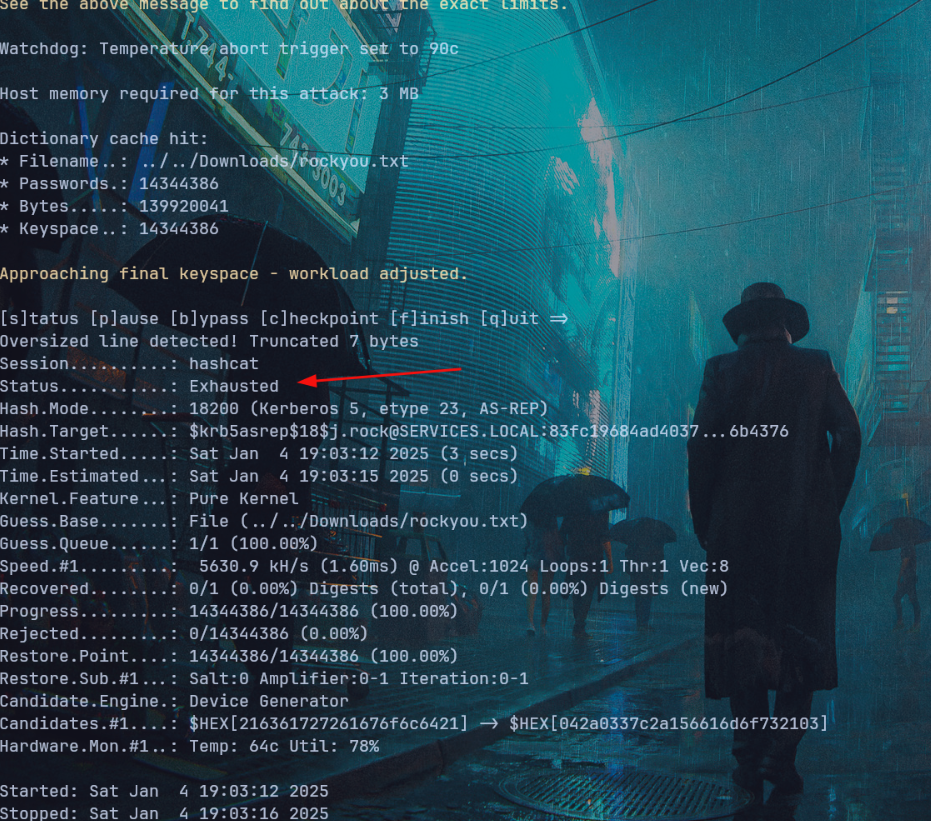
* After try with hashcat i was not able to crack it because the algorith used here was kinda strong to crack as we can see `$18`.
* And there i used impacket tool called GetNPUsers which suppose to give us the same thing but with weaker hash.
* And as we can see here this hash should be weaker let's give that a shot and crack it.\
`hashcat -m 18200 -a 0 ./hash ../../Downloads/rockyou.txt`\
\
And indeed we was able to crack it.\
`j.rock : Serviceworks1`
* As we get valid creds now we can see what does SMB have for us.
### SMB
* We can use tools like smbmap or smbclient to see what shares do we have.
* In my case i will use smbclient.
* First i will check the C$ share.
* We can find our flag there :)
## Getting Shell as j.rock
* I though that we maybe able to access the machine via evil-Winrm and indeed we can.
## Getting Administrator access
* The first thing i review when i access the machine was the permission.
* The server Operators Group is interesting group since it allow use to configure some aspect of the AD.\
* Using the above resource i was able to get administrator access The process went as follow.
* I create this payload using msfvenom.
* Then i setup the listener from metasploit.
* And now from the hacked machine we need to set the service and allow our shell to be executed as NT\Authority.
* Using the `services` command we see the running commands. You can choose one to execute the same steps but the only one that works with me was `cfn-hub`.
* Now we can start the service again.
* And now we are the super user.
* And here we have our flag.
## Conclusion.
* This machine was quite fun and easy as am not that good with Windows not AD. :)